Customize Your Shopify Draw Button and Entry Modal
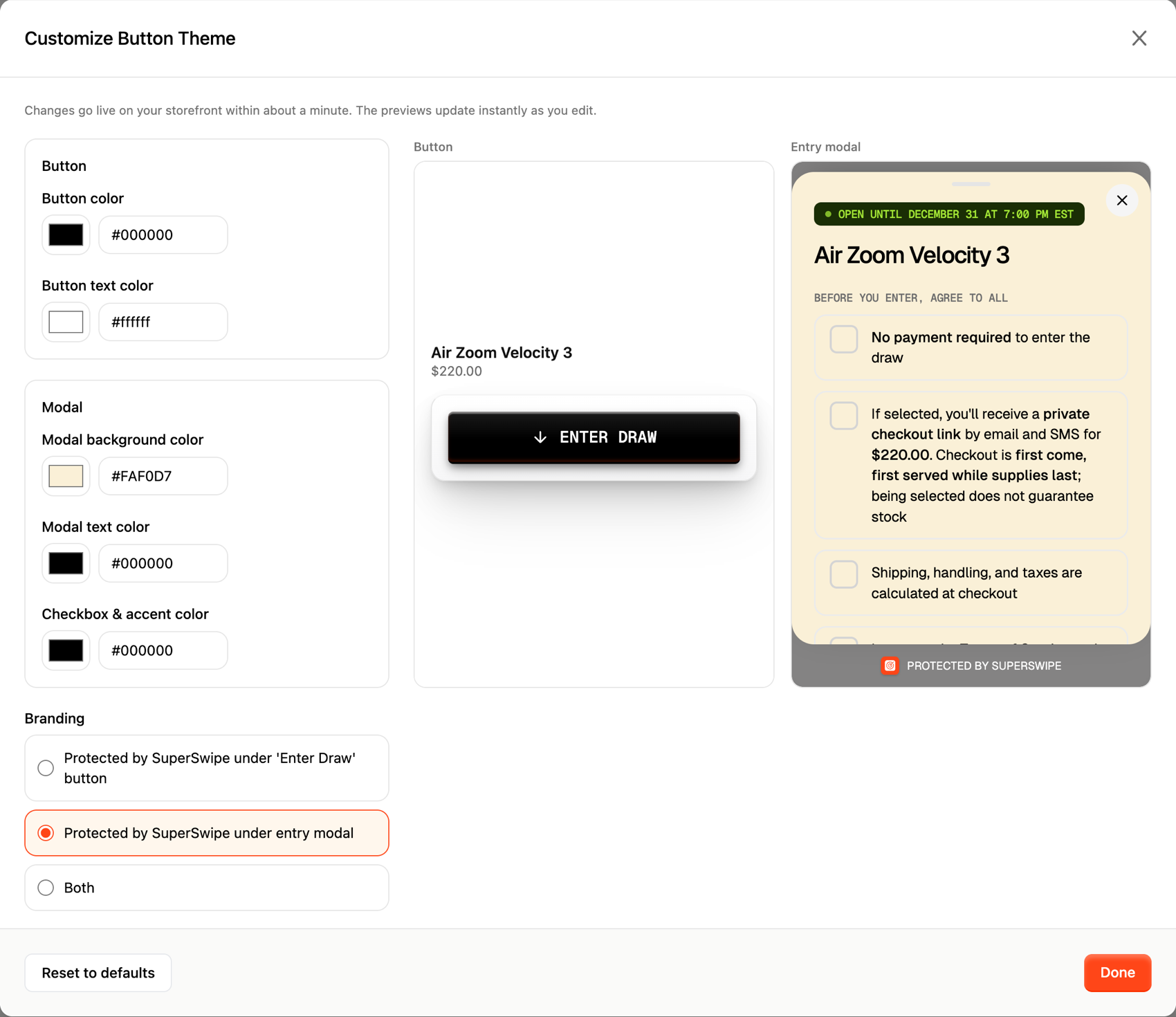
The SuperSwipe button and entry modal live on your product page, so they should look like your store, not ours. Customize Button Theme in Settings changes the colors, the font, and the branding line in a couple of clicks, previews every edit live, and updates your storefront in about a minute.
How Virginia themed the Jellyfish draw.
blackyachtrock.com runs on cream, black type, and a serif wordmark. For the VIRGINIA JELLYFISH (TRIPLE WHITE) draw, Virginia pointed SuperSwipe at the same palette, and the button reads like part of the theme.

Virginia's exact setup
- Button color #000000
- Button text color #FFFFFF
- Modal background #FAF0D7
- Modal text #000000
- Checkbox & accent #000000
- Aa Custom font Their own upload
-
 Branding line
Under the entry modal
Branding line
Under the entry modal
Every value here is pulled from their live theme. See it running on blackyachtrock.com.
The entry modal follows.
The theme is not just the button. On the live page, Virginia's entry modal opens in the same cream, sets the terms and size chips in black, and runs in the font they uploaded. Fans never leave the store's world to enter the draw.
The Protected by SuperSwipe line sits under the modal card, where Virginia chose to place it. The draw stays visibly protected without touching the brand's surface.
Everything you can dial in.
The theme covers the whole storefront surface: the button on your product page and the entry modal your fans fill out. No theme code, no app blocks to restyle. Every control lives in the SuperSwipe dashboard.
Button colors
Fill and label colors for the Enter Draw button, picked with a color wheel or exact hex values.
Modal colors
Background and text colors for the entry modal, so the terms, sizes, and forms read like a native part of your store.
Checkbox and accent
One accent color drives the agreement boxes, size chips, and focus states inside the modal.
Your own font
Upload a woff2, woff, ttf, or otf file up to 2MB and the button and modal set everything in your typeface.
Branding placement
Show the Protected by SuperSwipe line under the button, under the entry modal, or both. Fans see the draw is protected either way.
Celebrations
Confetti and a cha-ching sound after a successful entry, each with its own switch. Keep them, or keep it quiet.
Make the button feel native.
Button themes ship with every SuperSwipe plan, alongside the full feature set. Match your storefront in a couple of clicks, keep the draw protections your fans trust, and never touch theme code. Styling changes the surface. How the draw works stays the same underneath.